Query designer
The query designer (Premium) lets you build SQL queries visually, without writing SQL by hand. Add tables to the canvas, pick columns and define conditions - DbGate generates the SQL for you.
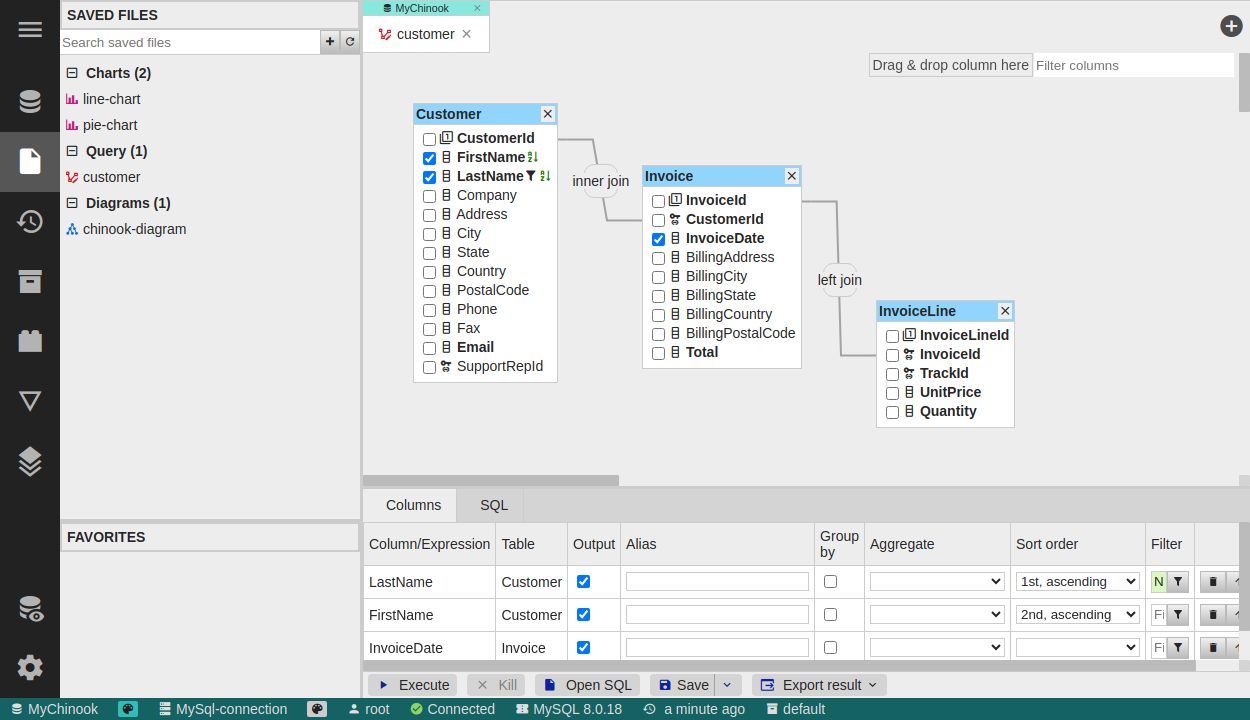
Building a query
- Add tables - drop tables onto the design canvas; DbGate draws relations from foreign keys automatically.
- Pick columns - choose which columns appear in the result, define sorting and grouping.
- JOIN types - besides the standard SQL joins (
INNER,LEFT,RIGHT), you can use pseudo-joins - the most useful beingWHERE NOT EXISTS. - Powerful filters - filter using the same engine as the data browser, including compound conditions and filtering by a set of values.
Result
The designer produces a normal SQL query, so it runs with the same performance as hand-written SQL. You can switch to the generated SQL at any time and continue editing it in the SQL editor.
Perspectives - the universal designer
For nested, hierarchical views - and for joining data across SQL tables and MongoDB collections on the client side - use Perspectives, which are not limited by what the source database can join.