Querying GraphQL APIs
Point DbGate Central at any GraphQL API and it discovers what is available for you - no need to dig through separate documentation.
Explore the schema
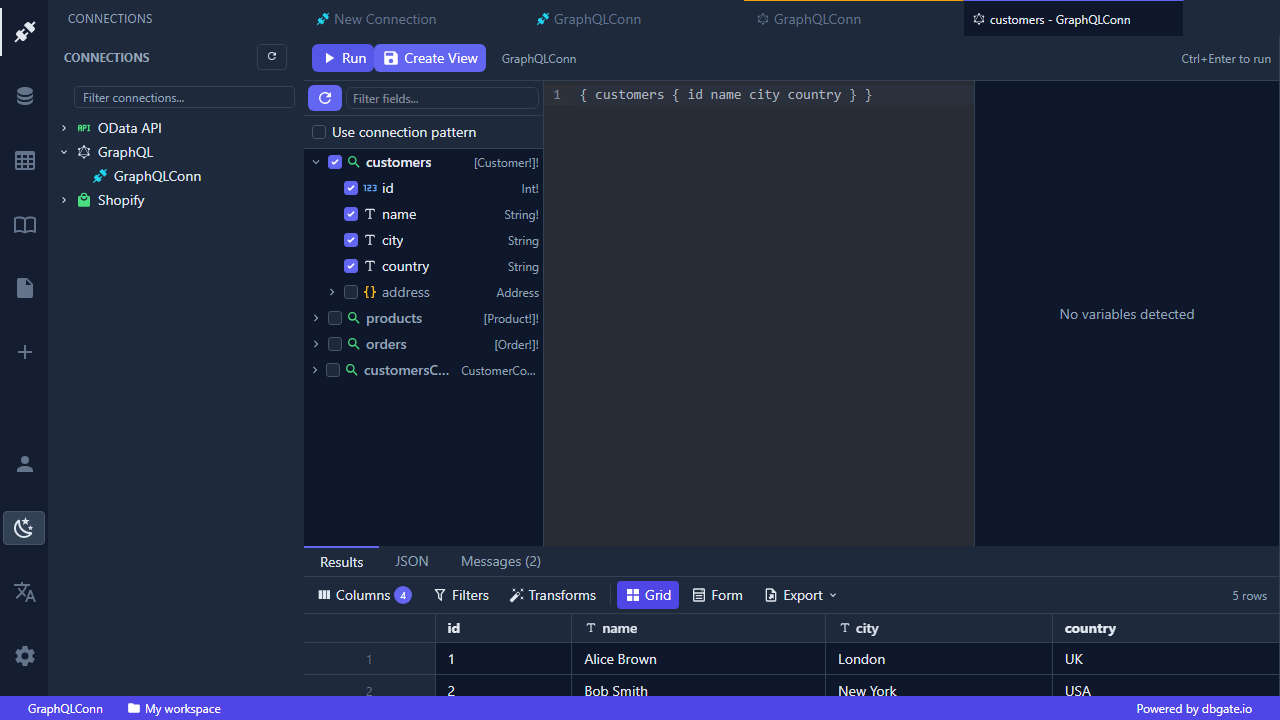
DbGate Central introspects the GraphQL schema as soon as you connect. Browse the available types and fields in the tree, then open a query tab to start working.
Run queries
- Write queries with the GraphQL editor and run them against the live API.
- Supply query variables alongside the query, either in a form or as raw JSON.
- Results come back in the same fast, sortable, filterable grid used everywhere in DbGate, so a GraphQL response feels like a database table.
- Nested objects and lists are returned as structured JSON you can expand and inspect in place.
Queried views are cached per connection, so reopening them is instant while you keep working.
GraphQL connections in DbGate Central are a separate, browser-based implementation from the desktop GraphQL feature - see that page if you are using the desktop app instead.