AI features
DbGate includes several AI-powered features (Premium and Team Premium). They are available to all Premium users with no API keys or configuration - DbGate uses its own AI gateway, which forwards requests to the LLM provider.

Database chat
Database chat is an AI chatbot that understands both your database schema and its data.
- Natural conversation - ask questions in any natural language and get answers or ready-to-run SQL.
- Context-aware - the model knows your schema and (with permission) live data, so it suggests correct joins, filters and aggregations.
- Iterative - refine with commands like “add a date filter” or “group by customer” and the query updates instantly.
- Charts - ask for a bar, pie or line chart built from the results.
- Consultant mode - it can analyze stored procedures and views, so you can ask things like “Explain procedure X” or “Which tables are affected by procedure Y”. DbGate shows which objects were analyzed.
Executing SQL - safety first
Database chat can run SQL to answer questions. You choose how:
- Ask before execute SQL (default) - DbGate asks before running each query.
- Execute SQL automatically - non-
SELECTqueries still require confirmation. - Never execute, only suggest SQL - the chat only shows queries; no data from your database is sent to the LLM.
If a suggested query fails, DbGate sends the error back to the model, which usually corrects the query automatically.
SQL AI assistant
Use the chat as a SQL assistant - “Write a SQL query for the top 10 customers by sales” - and open the result in a SQL editor tab.
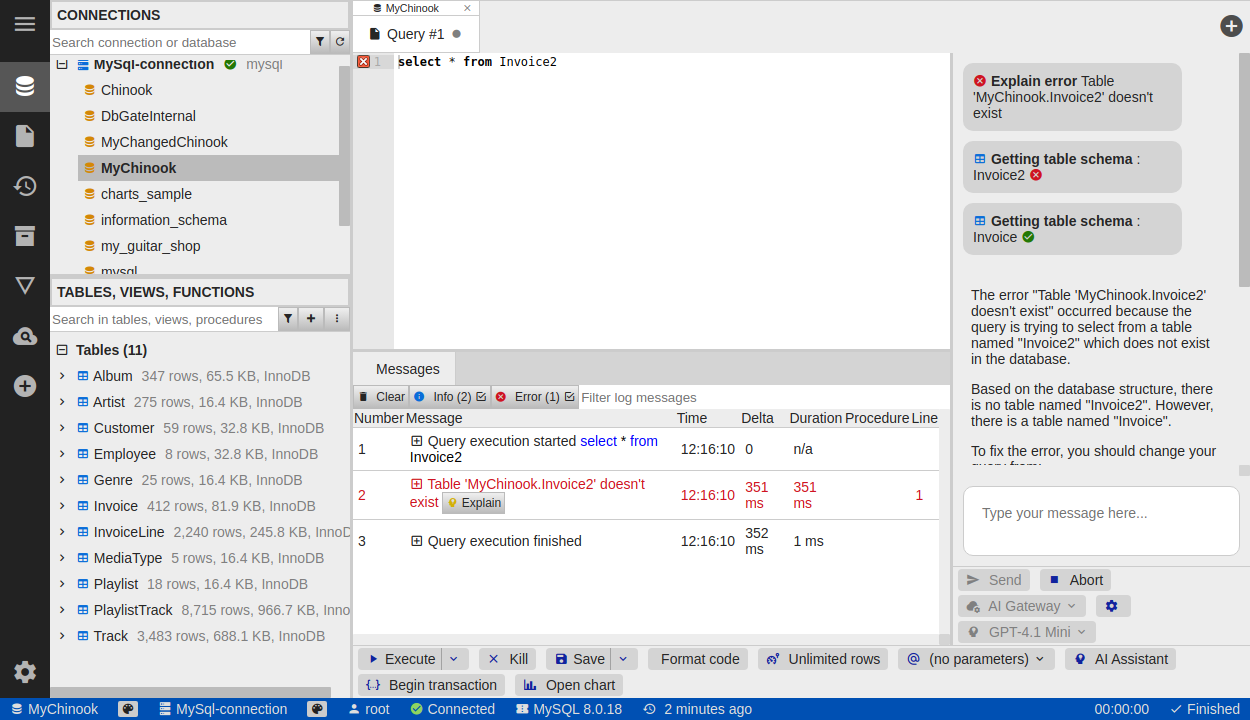
Explain SQL error
Click Explain next to an error message to get an AI explanation of what went wrong and how to fix it.
Theme AI assistant
The AI can also generate custom color themes - see Custom themes.
Disabling AI features
AI features can be turned off entirely (for example in restricted environments) through DbGate settings.