Table & schema editor
DbGate can create and modify database structure through a GUI, without writing DDL by hand. Open a table’s structure editor from its context menu (“Edit table”), or create a new table from the database context menu.
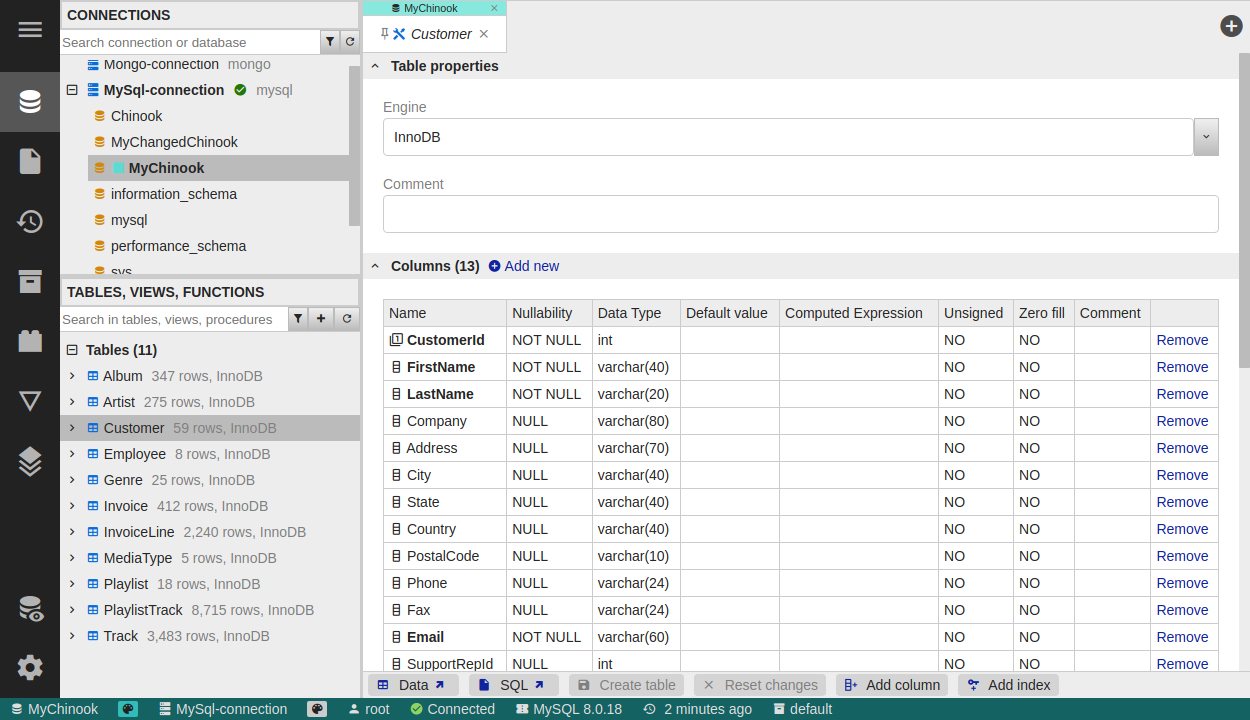
Editing tables
- Columns and data types - define columns, data types, nullability and defaults for new or existing tables.
- Keys and indexes - manage primary keys, foreign keys and indexes.
- Engine-specific properties - set database-specific options, such as the MySQL table engine.
SQL preview and safe changes
- SQL preview - before anything is saved, DbGate shows the generated SQL so you can review it.
- Table recreate warning - when a change requires recreating the table (a limitation of some databases), DbGate warns you and lets you inspect the generated script first.
Other database objects
You can also create, drop and modify other objects - views, stored procedures and functions - and browse tables, views, procedures, functions and MongoDB collections from the object tree.
Related pages
- Compare & deploy models - compare structure between databases and deploy changes (Premium)
- Database deploy - YAML/SQL model files and CLI deployment