Compare & deploy models
DbGate can compare database structure and deploy changes (Premium). This is useful for keeping environments in sync and for version-controlling your schema.
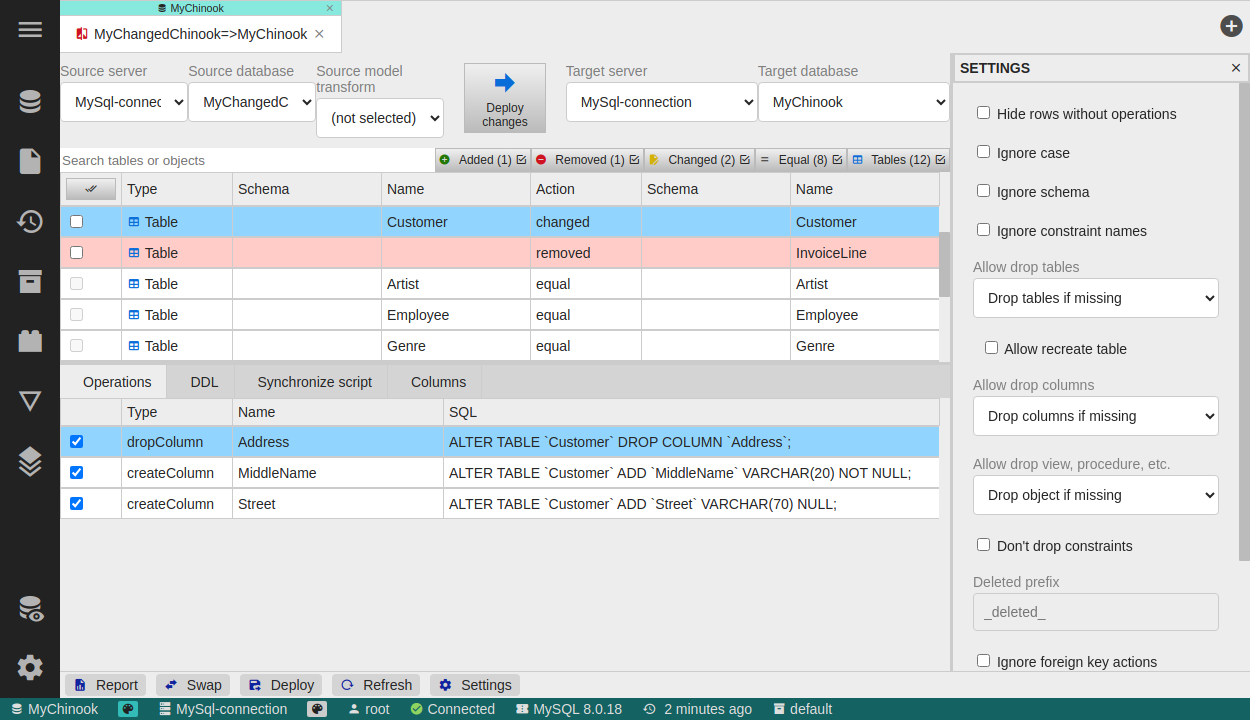
Compare databases
- Compare two databases - find differences in columns, view definitions and other SQL objects.
- Synchronize structure - generate and run the actions needed to make one database match another.
- Compare against a YAML model - compare a real database against a model stored in YAML and deploy the differences.
- Settings - control the comparison, for example ignore foreign keys, exclude specific objects or choose which synchronize actions to perform.
Export a database model
- Scaffold to a folder - save the model of an existing database to a folder, or to a single JSON file.
- YAML table files - tables are stored as simple YAML files that you can keep in a Git repository.
- SQL definition files - views, stored procedures and functions are stored as SQL files.
Deploy
Deploy the model visually with the Compare tool, or from the command line as part of a CI/CD pipeline. For the model file format and the CLI workflow, see Database deploy.
Related pages
- Table & schema editor - edit table structure through the GUI
- Database deploy - model file format and command-line deployment